martes, 8 de septiembre de 2015

Integrated Project Blog Activities

1.- Write a 150 words report about your project information:

 My proyect it is about a software simulator. The users will be able to solve problems of differential equations,  numerical methods and electrical circuits. that can simulate problems of the real life with mathematical thinking. The area that it is more significant my IP it is on the education because the students or teachers can solve and verify mathematical problems, but at the same time this simulator will be able to simulate problems or situations for organizations like a UNESCO or something like that. The impact of this kind of proyects is so big because a simulator using in all areas and can make the difference when it use. My team will program on Visual Studio with the language of C# beacause it is a simple language and we know it; But this is a difficult IP and it will test us, but i trust in my team and group.


2. Glossary of technical english terms.


1. Simulator: Virtual recreation of all kinds of scenarios , typical of video games. Multimedia advances to simulate , for example , from racing to Roman battles , through all the maneuvers of an airplane and complete football matches.

2. User manual: Is a technical communication document intended to give assistance to people using a particular system.

3. Variable: In programming, a variable is formed by a space in the storage system and a symbolic name that is associated with that space.

4.System:A group of interacting, interrelated, or interdependent elements forming a complex whole.

5. Numerical methods: They are techniques by which problems can be formulated so that they are resolved by arithmetic operations.

6. Analog electronics: It is a part of studying electronic systems whose variables (voltage, current , etc. ) vary on a continuous basis over time and can take ( at least theoretically) infinite values ​​.

7. Random numbers: It is a result of a random variable specified by a distribution function . When no distribution is not specified, it is assumed that you use continuous uniform distribution on the interval [ 0,1).

8. Differential equation: It is an equation relating nontrivial way an unknown function and one or more derivatives of the unknown function over one or more independent variables.

9. Diode: Electronic device with two electrodes through which current flows in one direction.

10. Resistance: Having a driver opposition to the passage of electric current.

11. Transistor: Small semiconductor device that opens or closes a circuit or amplifies a signal, it is used in integrated circuits to generate bits .

12. Current source: It is the device that converts alternating current, in one or more continuous current, which feed the various circuits of the electronic device to which it is connected ( computer, TV , printer, router , etc. ) .

13. Electrical circuit: It is an electrical network comprising at least one closed path.

14. Analysis: Detailed one thing to know their characteristics or qualities , or state examination, and draw conclusions , performed separately or considering separating the constituent parts .

15. SDLC: Systems Development Life Cycle, in systems engineering and software engineering is the process of creating or modifiación systems , models and methodologies that people use to develop these software systems.

16.Central Processing Unit (CPU): Basically the CPU is the Brain of the computer that performs instructions defined by software and its hardware.

17. UI (User Interface): User interface gives instructions using a mouse and clicking on menus and icons, This is so important in the POO. It’s know as “Form” in the programming.

18. Compiler: Programming language processor that translates a programwritten in a high-level language (the 'source program') which humans can understand, into machine languageprogram (the 'object program') which the computers can understand.

19. Source Code: Computer program written in a high-level language which is converted into object code or machine code by a compiler. Source code is the only stage where a programmer can read and modify a computer program. This is basically the soul of the program.

20. Random Access Memory (RAM): RAM pertains to the internal memory of a computer. RAM is usually a fast, temporary memory area where data and programs reside until saved or until the power is turned off.

21. Keyboard: It’s  a critical part in a computer (computer peripheral), it is compound by keys with letters, numbers and symbols that the peolpe use for type in a computer.

22. Visual Studio 2013 Pro: It is a program that the people can use for programming and it’s based on POO (Object-Oriented Programming) it is a Microsoft’s program and in this case we used it programming.

23. C# : Is an object oriented programming (OOP) language, and is an extension of C language, It’s one of the most popular languages primarily utilized with system/application software, drivers, client-server applications and embedded firmware.

24. Executable program: A file containing machine language instructions that can be directly executed by the computer and is no necessary install in the memory of the computer, the calculator is an Executable program.

25. Software: The programs used to direct the operation of a computer, as well as documentation giving instructions on how to use them, and is the parts of the computer that we can’t touche this componets.


viernes, 20 de marzo de 2015

Budget Costs Form, PI, 2D


  • 50 hours to work (4 people, 250 for hour) ----------------- $5,000.00
  • domains (.mx for 1 year)             ---------------------------- $1,500.00
  • fixed computer                             ---------------------------- $200.00
                                                                                           total: $6,700.00

miércoles, 19 de noviembre de 2014

Parts, functions and locations


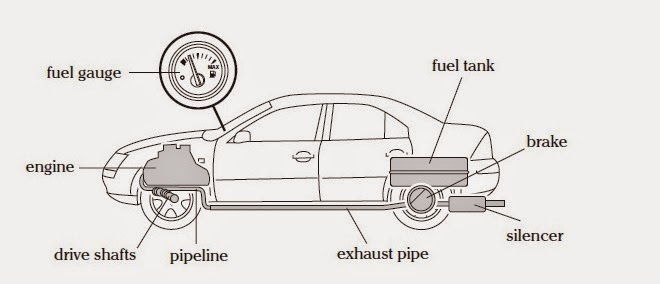
a) Look at the diagram and describe the function of each part:

  1. Silencer: Makes the car quieter.
  2. Brake: Makes the car stop.
  3. Fuel Tank: This stored the fuel.
  4. Exhaust Pipe: This guides the carbon diopside out of the motor.
  5. Pipeline: save the liquid of the car.
  6. Drive Shafts: Makes the directions of the car.
  7. Engine: Does the car works.
  8. Fuel Gauge: Show you the level of the fuel in the fuel tank.
b) Write a description of the location of the parts
  1. The silencer is at the back of the car
  2. The brake is at the wheels .
  3. The Fuel tank is on the back wheels.
  4. The exahust pipe is under the car.
  5. The pipeline is between of the engine and Drive Shafts.
  6. The drive shafts are at the front of the car.
  7. The engine is at the front of the car.
  8. the Fuel gauge is at front of the car's manubrium .

martes, 21 de octubre de 2014

Product comparison

1. Compare two products from the SOG catalogue.


  1. The POWERASSIST EOD has fuzewell spike, but it does'nt have a nail file.
  2. The POWERASSIST does'nt have multi-angle needle nose pliers, but it has philips screwdriver. 
  3. The POWERASSIST EOD has wire crimper, but it does'nt have V-cutter.
  4. The POWERASSIST is black oxide colour, but it isn't white steel colour.
  5. The POWERASSIST EOD does'nt have engravable, but ir has can opener.

2. Write a short paragraph (as a conclusion of your comparison)

This two products have a lot of tools that can use, you have many ways to choose how you want the product and what tools you need more, this multitools help you so good; this kind of virtual store are very dinamics and the way interacts with the customer is so good and pretty, I like it. 

sábado, 4 de octubre de 2014

Computer Assembly


  • Disassemble 
  1. First we have to open the computer case (there are many differents ways to do that).
  2. Once opened remove the drives, first we removed cd-rom and then we removed the floppy disk drive.
  3. Lastly extracted all drives´ cables attached to the keyboard then removed the ramp  by opening the clips that secure the RAM.
  4. Next we remove the wireless internet card, we separated it from its case after that i disconnected the microprocessor .
  5. Then check the microprocessor by releasing the letter.
  6. And finaly desconnected the motherboard, disconnecting the  Aires.


  • Reassemble 
  1. First intall the motherboard. secure it conected various kid .
  2. Then laid microprocessor back into its place and install the microprocessor fun.
  3. Connect the wireless internet card sliding its casing into place and connecting card to the motherboard.
  4. Next install the RAM inserted and lock iran into its slot on the motherboard.
  5. After that we connected the hard drive then the floppy disk drive and then the cd-rom drive.
  6. And finaly we close the computer case.

Diagram of the individual components of a computer.

Hard Drive

Microprocessor

Motherboard

CD-Rom

RAM

Computer´s Case


jueves, 18 de septiembre de 2014

Arduino

Arduino is a tool for making computers that can sense and control more of the physical world than your desktop computer. It's an open-source physical computing platform based on a simple microcontroller board, and a development environment for writing software for the board. Arduino can be used to develop interactive objects, taking inputs from a variety of switches or sensors, and controlling a variety of lights, motors, and other physical outputs.

  • It is an open-source project, software/hardware is extremely accessible and very flexible to be customized and extended
  • It is flexible, offers a variety of digital and analog inputs, SPI and serial interface and digital and PWM outputs
  • It is easy to use, connects to computer via USB and communicates using standard serial protocol, runs in standalone mode and as interface connected to PC/Macintosh computers
  • It is inexpensive, around 30 euro per board and comes with free authoring software
  • Arduino is backed up by a growing online community, lots of source code is already available and we can share and post our examples for others to use, too!.
The Arduino development environment contains a text editor for writing code, a message area, a text console, a toolbar with buttons for common functions, and a series of menus. It connects to the Arduino hardware to upload programs and communicate with them.
There are many other microcontrollers and microcontroller platforms available for physical computing. Parallax Basic Stamp, Netmedia's BX-24, Phidgets, MIT's Handyboard, and many others offer similar functionality.


Reference:
  1. http://arduino.cc/en/pmwiki.php?n=Guide/Introduction
  1. http://www.varesano.net/blog/fabio/what%20arduino%20why%20we%20choose%20it%20what%20can%20we%20do%20it
  1. http://arduino.cc/en/pmwiki.php?n=Guide/Environment 

sábado, 6 de septiembre de 2014

symbols and meaning


  • km     = kilometre
  • +        =    plus
  • g        = gravity
  • in       =  inch
  • kW     = kilowatt
  • kg      = kilogram 
  • L        = liter
  • V        = volt
  • A        = area
  • °         = degree
  • rpm    = Revolutions per minute 
  • C        = Celsius
  • km/h  = kilometers per hour
  • m       = meter
  • £        = pound
  • -         = less
  • ft        = foot
  • €        = euro
  • W       = watt
  • gal     = one centimeter per second squared


domingo, 31 de agosto de 2014

Business card!

                                                               Infront


                                                                 Behind


                          Symbol                                                                 How write
___________________________________________________________________

                            @                                                                            At
                             #                                                                     number sign
                            %                                                                       percent sign
                            ^                                                                            carot
                            *                                                                              star
                            (                                                                  opening parentheses
                            )                                                                   closing parentheses
                           _                                                                         underscore
                           -                                                                              dash
                          +                                                                            plus sign
                          =                                                                           equals sign
                           \                                                                            black slash
                          [                                                                         opening bracket
                          ]                                                                          closing brace
                          ;                                                                             semicolon
                          '                                                                              apostrophe
                          :                                                                                 colon
                        " "                                                                         dialogue symbol
                          ,                                                                                  coma
                          .                             period (text) /dot (computer) /point (mathematics)
                          /                                                                            forward slash
                        <                                                                            less than symbol
                        >                                                                           more than symbol
                        ?                                                                              question mark


http://quizlet.com/5750696/symbols-flash-cards/

lunes, 25 de agosto de 2014

Write Up

Integrated Project “Write Up”
number
 5# (FIE-RUDOS)      1-D
Group Members

1. David Clemente Guerrero Orozco
2. Abel Cisneros Ramírez
3. Carlos Andres Ponce Flores
4. Ramirez Gordillo Hugo Yael
5. Jose Tapia Enciso 
My responsibilities
I have been searching on books things about the history of the computer, I typed the protocol's justification and some of the history about it, for now my team isn't programming and designing the virtual calculator, we will start it on the second partial.
Scope
This proyect is about a virtual calculator that will work in a computer and if my team can do that the virtual calculator works on a smartphone  could be works there too. It will resolve problems of calculus and analytic geometry, physical, mathematical logic and algebra. The period of time that we have to do it is about 3 months, and all that my team want is virtual calculator will be able to be use for every student in around the world, that means the calculator will be simple, that's it.
Communication strategies
Communication methods to collaborate with each other. The best is work toggether in the same roof, the roof in this case it's the campus' library and we use Facebook too, there we share the different information that each other has. That is the strategies we use no more.

miércoles, 20 de agosto de 2014

¡Hello World!

University of Colima
Ing. Computer Systems
Hi my name is David
I am 18 years old, I am from Manzanillo, Colima. I born here
I like rock music, classical music and metal music, I don´t like the mexican popular music, be honest I hate it jaja
I like read books of science, tecnology and some fantastics novels, my favorit novel is "a song of ice and fire" R.R.MARTIN´s novel, in fact that novel has a tv serie its name is "Game Of Thrones".
When i watch TV i just watch NatGeo, Discovery scince and some of Histoy channel or something of Netflix
I love videogames, movies (comedy,action,terror and superheros movies).
I played electric guitar and electric bass but i have 3 years that i don´t play them anymore.
I choose ISC because I like all about computers and tecnology and I want lern more things about that.
My group is so good, in just 3 weeks(with propedeutico) we have nice relationship and i hope grow up with the time, the INTEGRATING PROYECT looks so difficult but i think beacuse we are new and just we have to hard work and i would like that all nmy classmates finish and pass this semester. bye people, ¡see yo later!